
Lion Panel IPTV

Lion IPTV Panel Features

Lion IPTV Panel Features for Smarter Reseller Management

Create eligible customer accounts, manage available account formats, review reseller credits and organize subscription renewals through one structured Lion IPTV reseller workspace.

Customer Accounts

Account Formats

Credit Control

Account Renewals

Available features, account formats and reseller options may depend on the current Lion IPTV panel setup.

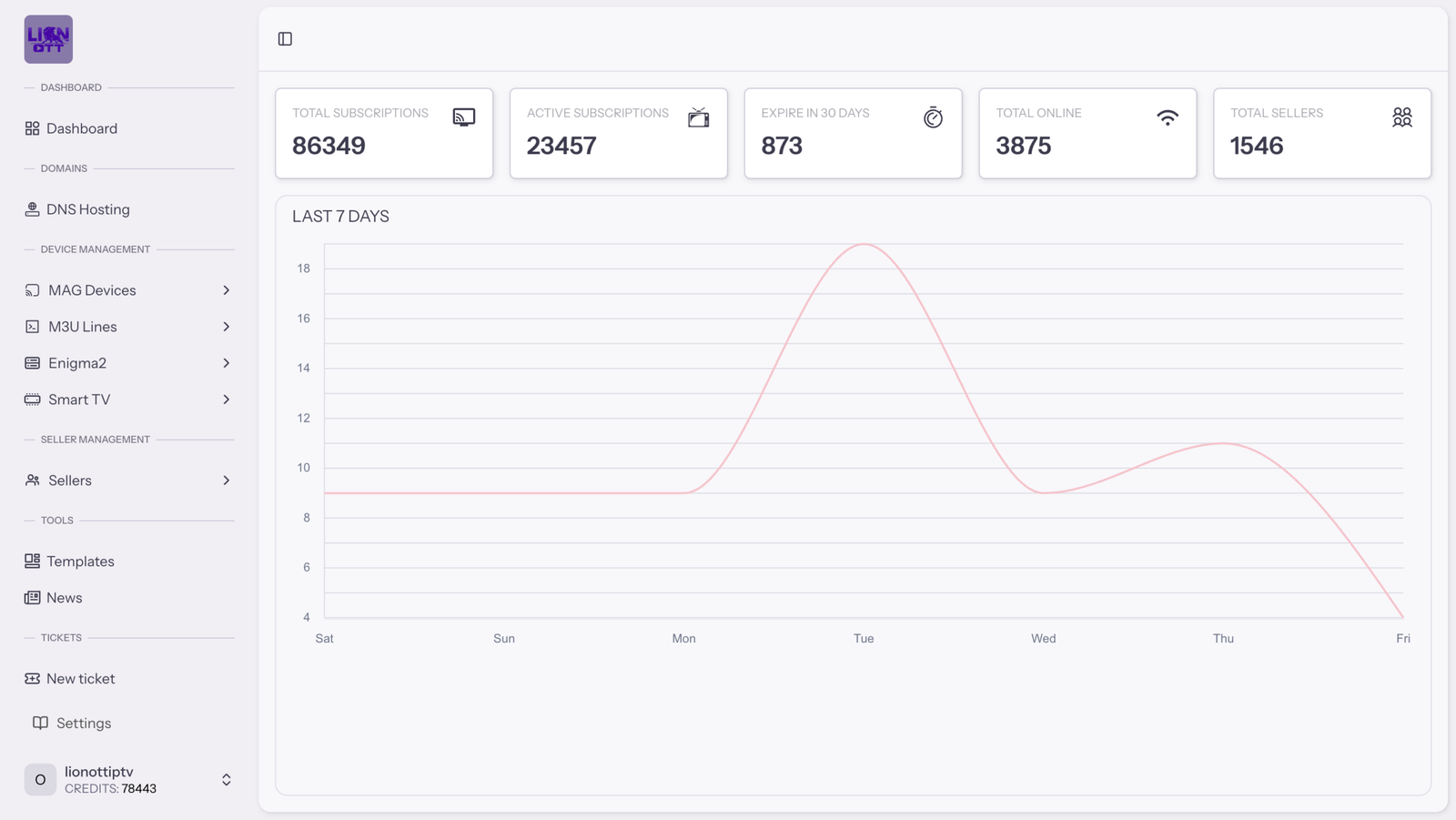
Lion IPTV reseller panel dashboard showing customer account, credit and management features
Account Management Areas
M3U MAG Enigma2 Smart TV
Core Panel Capabilities

Essential Tools Inside the Lion IPTV Reseller Panel

The Lion IPTV panel brings the main customer-account, credit-management and renewal tasks into one organized workspace, helping resellers follow a clearer daily management process.

02
Supported Setups

Multiple Account Formats

Access the management areas currently available for eligible M3U, MAG, Enigma2 and Smart TV customer setups.

M3U MAG Enigma2 Smart TV
View Account Formats
03
Customer Options

Package Assignment

Select and assign an eligible package option according to the customer account being created, managed or renewed.

  • Available package selection
  • Subscription-duration control
Explore Package Tools
04
Balance Visibility

Reseller Credit Control

Review the available reseller credit balance before creating or extending an eligible customer subscription.

Available Balance Credit overview
Explore Credit Tools
05
Subscription Activity

Account Renewals

Extend eligible customer subscriptions using an appropriate available duration while keeping renewal activity easier to follow.

  • Eligible subscription extensions
  • Available duration selection
View Renewal Workflow
06
Centralized Workspace

Organized Dashboard Workflow

Move between the main customer, account-type, reseller and configuration areas through one structured panel interface.

Explore Dashboard Workflow
Feature availability can depend on the current reseller setup

Confirm the account formats, package options and panel tools required for your intended customer-management workflow before choosing a reseller package.

Ask About a Feature
Customer Account Management

Manage the Complete Customer Account Lifecycle

Use a structured workflow to create eligible customer accounts, review their main subscription information, apply available management options and process renewals when required.

Preview the Reseller Dashboard
01
New Customer

Create

Add an eligible customer account using the appropriate account format and currently available setup options.

Account creation
02
Account Details

Review

Check the main available subscription and account information before applying another eligible management action.

Information review
03
Available Controls

Manage

Apply an eligible package, duration or account option according to the customer setup currently being managed.

Account management
04
Subscription Extension

Renew

Extend an eligible customer subscription using an appropriate available duration and the applicable reseller credit balance.

Eligible renewal
Customer Workspace Account Management
Available
New Account
Account Management Tools

Keep Customer Information and Account Activity Easier to Follow

A centralized customer workspace reduces the need to depend on disconnected notes when managing multiple accounts, packages and subscription renewal requirements.

Structured account creation

Follow a consistent process when adding an eligible new customer account.

Central customer information

Review the main available account and subscription details from one management area.

Clearer package control

Connect the eligible customer account with an appropriate available package and duration.

Organized renewal workflow

Process eligible subscription extensions using the currently available account-management options.

One repeatable account-management process

Use the same structured workflow when creating, reviewing, managing and renewing eligible customer accounts.

Explore Account Formats
Account Management Areas

Manage Available IPTV Account Formats

Access the account-management areas currently available through the Lion IPTV reseller panel and organize eligible customers according to the appropriate supported setup.

Reseller Workspace Account Formats
Available Areas
Account Types
M3U Accounts
MAG Accounts
Enigma2 Accounts
Smart TV Accounts
Selected Area M3U Account Management
Create Account
Account Format M3U Selected management area
Package Option Available Confirm current selection
Duration Selectable Eligible available term
Account workflow
01 Choose Format
02 Select Option
03 Create Account

Available settings depend on the selected account format and current reseller configuration.

Organized by Account Type

Choose the Appropriate Management Area for Each Eligible Setup

Different customer setups may require different account formats. The Lion IPTV reseller panel separates the available formats into organized management areas, helping you follow the appropriate workflow for the account being created or managed.

Select the account format

Start from the panel area that matches the eligible customer setup.

Review available options

Check the package, duration and account options currently available for the selected format.

Apply the appropriate setup

Create or manage the eligible account using the corresponding panel workflow.

M3U
Playlist-Based Format

M3U Accounts

Manage eligible playlist-based customer accounts using the options currently available through the corresponding reseller-panel area.

Dedicated account-management area
MAG
Device-Based Setup

MAG Accounts

Organize eligible MAG-based customer setups through the available MAG account-management section inside the reseller workspace.

Structured MAG account workflow
E2
Receiver Configuration

Enigma2 Accounts

Access the currently available management options for eligible Enigma2 customer configurations from the appropriate panel area.

Organized Enigma2 management
TV
Smart TV Setup

Smart TV Accounts

Manage eligible Smart TV account options currently supported through the corresponding area of the Lion IPTV reseller panel.

Dedicated Smart TV account area
Confirm compatibility before creating a customer account

Account-format availability does not automatically confirm compatibility with every device, application or customer configuration. Confirm the current supported setup with the Lion IPTV team before assigning an account option.

Confirm an Account Format
Credits, Packages and Renewals

Keep Credit Usage and Package Assignment Organized

Review the available reseller credit balance, select an eligible package and apply the appropriate subscription duration when creating or renewing a customer account.

Learn How Reseller Credits Work
Reseller Workspace Credit and Package Control
Balance Available
Available reseller balance Review Before Activation

Confirm that the available balance is appropriate for the eligible package and subscription duration being selected.

01
Step One Review Balance
02
Step Two Select Package
03
Step Three Apply Duration
Eligible Customer Account Package Assignment Preview
Available options
Account format Select available format
Customer package Select available package
Subscription duration Select eligible duration

Connect Every Eligible Account Action With the Appropriate Credit Use

Credit visibility is most useful when it remains connected to the customer account, package and duration being managed. This creates a clearer process for new activations and eligible subscription renewals.

Review the available balance

Check the reseller credit overview before applying an eligible activation or renewal.

Select an available package

Connect the customer account with an appropriate package option from the currently available selection.

Apply the appropriate duration

Choose an eligible subscription term according to the customer requirement and applicable credit use.

Process an eligible renewal

Use the available duration and applicable balance to extend an eligible customer subscription.

01

Credit Balance Visibility

Review the available reseller credit balance before performing an eligible account-management action.

02

Package Selection

Choose an appropriate currently available package for the eligible account being created or managed.

03

Duration Control

Select an eligible subscription duration according to the customer requirement and available panel options.

04

Renewal Management

Extend an eligible customer subscription using the appropriate available term and applicable reseller balance.

Credit usage depends on the selected eligible account option

Confirm the current credit requirements, available packages, subscription durations and applicable conditions before creating or renewing a customer account.

Ask About Credit Usage
Daily Reseller Workflow

Complete Everyday Reseller Tasks From One Workspace

Follow a clearer process when responding to customer requests, reviewing available account options and completing eligible account-management tasks through the Lion IPTV reseller panel.

Move From Customer Request to the Appropriate Panel Action

A structured daily workflow helps you identify what the customer needs, select the correct management area and review the available options before completing an eligible account action.

01
Understand the requirement

Review the Customer Request

Identify whether the request concerns a new account, an available package, an account format or an eligible renewal.

02
Open the correct panel area

Choose the Account Action

Move to the appropriate customer-account, account-format, package or renewal area inside the reseller workspace.

03
Confirm the available selection

Review the Available Options

Check the eligible account format, package, subscription duration and applicable reseller credit use.

04
Finish the eligible task

Complete the Panel Action

Create, manage or renew the eligible customer account using the appropriate currently available panel option.

Lion IPTV reseller managing daily customer accounts and subscriptions from a laptop
Practical Task Mapping

Match Each Customer Request With the Appropriate Panel Task

The exact available action depends on the customer account, selected format, reseller balance and current panel configuration.

New customer
Create an eligible customer account
Account setup organized
Account-format request
Select an available management area
Appropriate workflow selected
Package requirement
Review and assign an eligible package
Available option connected
Subscription renewal
Select an eligible renewal duration
Subscription extension processed
Credit planning
Review the available reseller balance
Credit requirement clarified
Review the available information before completing an account action

Confirm the customer requirement, account format, package, subscription duration, applicable credit use and current service conditions before completing an eligible activation or renewal.

Ask About Your Workflow
Organized Reseller Dashboard

Find the Main Management Areas From One Dashboard

Use a centralized panel interface to move between customer accounts, available account formats, reseller information and configuration areas without depending on disconnected management records.

Open the Full Dashboard Preview
Lion IPTV Reseller Dashboard
Panel Overview
Lion IPTV reseller dashboard with sidebar navigation, summary cards and activity chart
Dashboard Navigation

Move Between the Main Reseller Areas More Efficiently

The dashboard navigation separates the available customer, account-type, reseller and configuration tools into recognizable sections, making everyday panel movement easier to follow.

Choose the appropriate management area.

Review the currently available information.

Complete the eligible panel task.

01

Dashboard Summary

Review the main visible reseller and account information from the central dashboard overview.

Central overview
02

Customer Accounts

Access the available tools for creating, reviewing and managing eligible customer accounts.

Account management
03

Account-Type Areas

Move between the available M3U, MAG, Enigma2 and Smart TV management sections.

Format navigation
04

Reseller Information

Review the available reseller information and reach the corresponding management options.

Reseller workspace
05

Templates and Tools

Reach the currently available template and supporting reseller tools from the organized panel navigation.

Available tools
06

Configuration and Support

Access the available configuration and support areas when account or panel clarification is required.

Panel assistance
Centralized navigation

Reach the main available account and reseller tools from one organized interface.

Clearer operational overview

Review the visible dashboard information before opening a detailed management area.

More consistent panel movement

Use recognizable navigation areas for recurring customer and reseller tasks.

Fewer disconnected records

Keep the main management workflow inside the reseller panel rather than across scattered notes.

Want a closer look at the Lion IPTV reseller interface?

Visit the dedicated dashboard page to review the larger panel preview and learn more about the visible reseller-management areas.

View the Full Dashboard
Practical Workflow Benefits

How Lion IPTV Panel Features Support Your Reseller Workflow

Panel features become useful when they help make recurring customer-account, credit and renewal tasks easier to understand, organize and complete consistently.

01
Customer Management

More Direct Account Handling

Access the main available customer-account tools without relying on separate records for every routine account-management action.

A clearer path from customer request to the corresponding panel task.

02
Credit Organization

Clearer Credit Planning

Review the available reseller credit balance before creating or renewing an eligible customer subscription.

Credit review remains connected to real customer-account activity.

03
Workspace Structure

Better Customer Organization

Keep account formats, packages, durations and renewal activity easier to follow through recognizable management areas.

Related customer information remains within one structured workspace.

04
Repeatable Workflow

More Consistent Operations

Follow the same structured process when responding to new-account, package, format and eligible renewal requests.

Recurring reseller tasks can follow one understandable management sequence.

Feature-to-Benefit Mapping

Understand the Operational Purpose of Each Panel Feature

The available feature provides the management tool. The workflow benefit explains how that tool can support a recurring reseller task.

Customer-account tools
Create and manage eligible accounts
More direct account handling
Account-format areas
Separate available customer setups
Clearer format organization
Credit-balance overview
Review available reseller credits
Better credit planning
Package and duration tools
Apply an eligible customer option
More consistent package assignment
Renewal management
Extend eligible subscriptions
Organized renewal activity
Dashboard navigation
Reach the main management areas
A more connected workspace
Workflow results depend on how the available panel features are used

The panel can support account organization and recurring reseller tasks, but the reseller remains responsible for reviewing customer requirements, available options and applicable conditions before completing an action.

Discuss Your Requirements
Complete Feature Overview

Lion IPTV Reseller Panel Feature Checklist

Review the main customer-account, format, credit, renewal and dashboard-management capabilities described across the Lion IPTV panel feature page.

Feature categories

Review the Main Capabilities in One Place

The checklist groups related features according to their practical role inside the reseller-management workflow.

4 Feature categories
18 Management capabilities
1 Structured workspace
Category 01

Customer Account Management

05

Tools and workflows related to creating, reviewing and maintaining eligible customer accounts.

  • Customer account creation

    Create an eligible account using the appropriate available panel options.

  • Account information review

    Review the main visible account and subscription information.

  • Eligible account management

    Apply an available management action to an eligible customer account.

  • Package assignment

    Connect an eligible account with an appropriate available package option.

  • Subscription renewal

    Extend an eligible customer subscription using an available duration.

Category 02

Account Format Areas

04

Separate management areas for the eligible customer-account formats currently described on the Lion IPTV panel.

  • M3U account-management area

    Access the available workflow for eligible playlist-based customer accounts.

  • MAG account-management area

    Organize eligible MAG-based customer setups from the corresponding panel area.

  • Enigma2 account-management area

    Reach the available options for eligible Enigma2 customer configurations.

  • Smart TV account-management area

    Manage eligible Smart TV account options through the corresponding section.

Category 03

Credit and Package Control

04

Available controls that connect reseller credits with packages, subscription durations and eligible customer actions.

  • Credit-balance visibility

    Review the currently available reseller balance before an eligible account action.

  • Available package selection

    Choose an appropriate package from the currently available customer options.

  • Subscription-duration selection

    Apply an eligible term according to the customer requirement.

  • Renewal credit management

    Connect eligible subscription extensions with the applicable available reseller balance.

Category 04

Dashboard and Workspace

05

Central dashboard areas that help keep the main reseller-management workflow organized.

  • Dashboard summary

    Review the main visible account and reseller information.

  • Centralized panel navigation

    Move between the main available management areas from one interface.

  • Reseller information areas

    Access the available reseller information and related panel options.

  • Templates and supporting tools

    Reach the currently available templates and supporting reseller areas.

  • Configuration and support access

    Open the available configuration and assistance areas when clarification is required.

Workflow Coverage

Main Reseller Tasks Covered by the Available Feature Areas

Feature-page overview
Customer accounts Account lifecycle
Account formats M3U, MAG, Enigma2 and Smart TV
Credit workflow Balance, packages and durations
Renewal activity Eligible subscription extensions
Panel workspace Central dashboard navigation
Checklist inclusion does not guarantee identical availability in every reseller setup

Confirm the account formats, customer options, credit requirements, subscription durations, dashboard tools and applicable conditions currently available for the reseller package you are considering.

Confirm Feature Availability
Verify Before Choosing a Package

Confirm the Features Required for Your Reseller Setup

Account formats, packages, subscription durations, credit requirements and reseller tools can depend on the currently available Lion IPTV panel configuration. Confirm the details that matter to your workflow before ordering.

Review the Exact Panel Options Your Customer Workflow Requires

A focused verification process helps separate the features shown across the website from the specific options currently available for the reseller package you are considering.

Confirm first

Required Account Formats

Clarify whether the M3U, MAG, Enigma2 or Smart TV account-management area required for your customers is currently available.

Review the selection

Packages and Durations

Confirm the customer package options and subscription durations currently available inside the relevant account workflow.

Understand the requirement

Applicable Credit Usage

Ask how the selected eligible account option and duration use the currently available reseller credit balance.

Clarify panel access

Dashboard Tools and Conditions

Verify the dashboard tools, management permissions, setup process and service conditions connected to the selected reseller option.

Your information

What You Should Explain

  • Estimated number of customer accounts
  • Required account-management formats
  • Preferred subscription durations
  • Panel tools required for your workflow
  • Reseller credit package being considered
Current details

What the Team Should Confirm

  • Current account-format availability
  • Available package and duration options
  • Applicable reseller credit requirements
  • Available dashboard-management tools
  • Setup process and applicable conditions
Website descriptions should not replace current package confirmation

Feature descriptions provide a general overview of the Lion IPTV reseller workflow. Confirm the current package price, credit quantity, feature availability, activation process and applicable service conditions before completing an order.

Read Feature Questions
Panel Feature Questions

Questions About Lion IPTV Panel Features

Review focused answers about customer-account tools, available account formats, reseller credits, package controls, renewals and dashboard organization.

01 What features are available inside the Lion IPTV reseller panel?

The Lion IPTV reseller panel includes available management areas for eligible customer accounts, account formats, reseller credits, customer packages, subscription durations, renewals and dashboard organization.

The exact options can depend on the current reseller setup. Confirm any feature that is essential to your intended workflow before choosing a package.

02 Can I create and renew customer accounts from the panel?

The panel provides available workflows for creating eligible customer accounts and extending eligible subscriptions using an appropriate package, duration and applicable reseller credit balance.

Review the account information and confirm the available options before completing an activation or renewal.

03 Which IPTV account formats can I manage?

The currently described panel areas include management sections for eligible M3U, MAG, Enigma2 and Smart TV customer setups.

Account-format availability does not automatically confirm compatibility with every device, application or configuration. Confirm the required customer setup with the Lion IPTV team before assigning an account option.

04 Can I review my available reseller credit balance?

The reseller workspace provides an available credit overview that can be reviewed before creating or renewing an eligible customer subscription.

The applicable credit use depends on the selected account option, subscription duration and current reseller conditions.

Visit the Lion IPTV reseller panel page for the detailed credit explanation.

05 Can I assign different packages and subscription durations?

You can select from the package and duration options currently available for the eligible customer account being created, managed or renewed.

Confirm the current selection and applicable credit requirement before applying an account action.

06 Does the panel help organize expiring customer accounts?

The panel helps keep customer-account and subscription information inside a structured management workspace, making eligible renewal activity easier to follow than disconnected records.

The reseller should still review each account and verify the available renewal option before extending a subscription.

07 Where can I preview the Lion IPTV reseller dashboard?

You can visit the dedicated Lion IPTV panel dashboard page to review a larger interface preview and learn about the visible management areas.

A dashboard preview provides visual information but does not replace confirmation of the exact tools included with the reseller setup you are considering.

08 Are all panel features included with every reseller package?

Do not assume that every account format, package option, duration, permission or management tool is identical across every reseller setup.

Before ordering, confirm the current package price, credit quantity, feature availability, dashboard options, activation process and applicable conditions with the Lion IPTV team.

You can also review the available Lion IPTV reseller pricing before contacting the team.

Feature answers describe the general reseller-panel workflow

Current feature availability, account formats, credit requirements, package options, durations and reseller conditions should be confirmed directly before completing an order.

Contact the Lion IPTV Team
Explore Your Reseller Options

Ready to Explore the Lion IPTV Panel Features?

Tell our team which account formats, customer-management tools and reseller options you need. We can clarify the currently available panel features before you choose a reseller package.

Confirm current account formats

Clarify packages and durations

Review applicable credit requirements

Check dashboard tool availability

Panel tools, account formats, packages and credit requirements may depend on current availability and applicable reseller conditions.